AI-sorted inbox for notes & links
Save everything. Find it in seconds.
Assorta is one fast inbox for links, notes and ideas. Drop anything in - AI files it into the right group, so you never dig through a graveyard of saves again.
Get Assorta →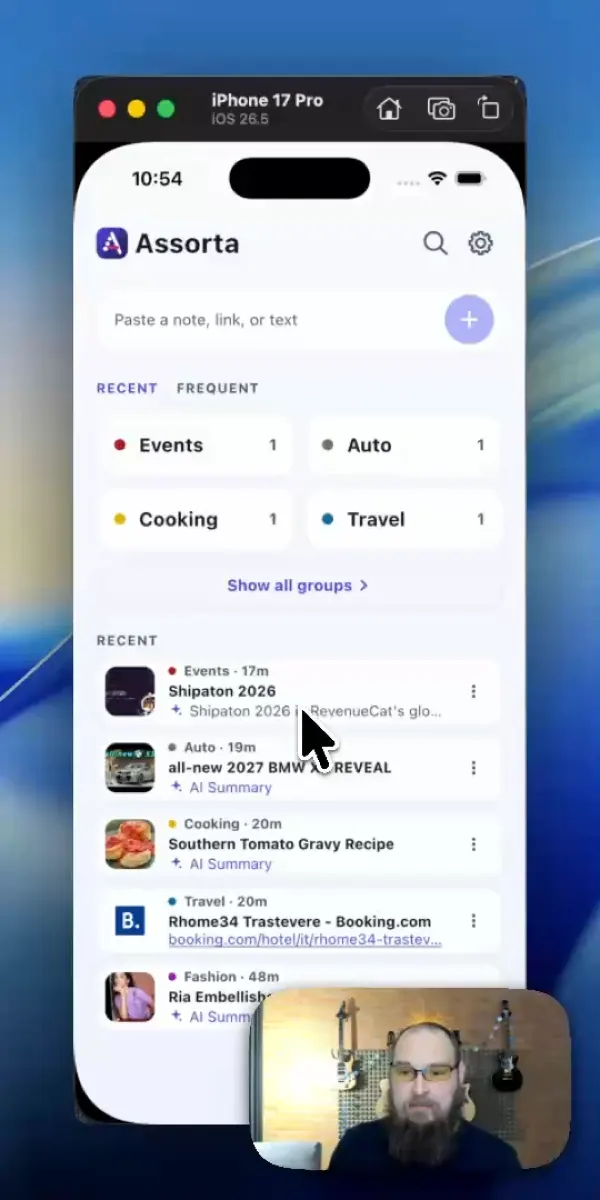
Demo
Watch a link land in the right group
Under forty seconds through the app: a link goes in, AI reads it and files it, and it is sitting in the right group when you come looking. Nothing to name, nothing to tag, no folders to keep tidy.
Get Assorta →Prefer YouTube? Watch it there ↗
A look inside
Five steps through Assorta
Share a link from any app or paste it in, watch AI file it, then browse groups with rich previews - Sport, Auto, Shopping, Hobby and more.
The links, logos and product images in these screens are example content. Assorta is not affiliated with the brands shown.












← swipe through the screens →
How it works
You add. AI organizes. You find.
No folders to create, no tags to manage, no cleanup day. The sorting you always postpone is the part that happens on its own.
Drop it in
Paste text, or share straight from YouTube, TikTok, Instagram or your browser - Assorta lives in your share sheet.
AI files it
Assorta reads what it is and puts it in the right group: Travel, Cooking, Wish list, Movies, Health - 30+ groups, zero setup.
Find it fast
One colorful dashboard with rich link previews. Open the group, and it’s exactly where you’d expect it to be - or search your notes and groups when you want one exact save.
Remember why
Tap AI Summary on a saved link and the page comes back in a few lines, right there in the list. Included with Assorta Pro. When a page gives it nothing to work with, Assorta says so instead of inventing a summary.
Features
Built for the two seconds you’re willing to spend
Saving something should cost nothing. Finding it should cost even less.
Share-sheet saving
Assorta sits in the system share menu on Android and iOS. Two taps and it’s saved - you never leave the app you’re in.
30+ smart groups
Assorta files each save into one of 30+ built-in groups the moment you add it - Travel, Cooking, Wish list, Sport. Disagree? Change it with one tap, right from the confirmation.
Link previews
Assorta keeps a saved link’s thumbnail and title - a YouTube frame, a product shot, an article cover - so you recognize it at a glance.
AI Summary
Tap AI Summary on a saved link and Assorta brings the page back in a few lines, without opening it. The summary is kept with the note, so the second look is instant and works offline. Included with Assorta Pro.
Search when you need it
Assorta searches group names, a note’s own text and a link’s title from one field - for the save that did not land where you looked first.
Saves in the background
Assorta finishes a save in the background, so switching apps halfway through still lands the item in its group. Nothing gets lost between apps.
Android and iOS
Assorta runs on Android phones and tablets, iPhone and iPad. Notes stay on the device you saved them on; syncing between devices isn’t there yet.
Sorting that never runs out
Assorta sorts with AI while your free sorts last, then falls back to smart sorting, which runs on the device against about 3,000 curated terms. Either way the note lands in a group - the filing does not stop when the quota does.
Groups
A place for everything you’d ever save
These groups already exist the moment you install - no empty-notebook anxiety, no taxonomy homework.
FAQ
Questions people ask before they install
What is Assorta?
Assorta is one inbox for links, notes and ideas on Android and iOS. AI reads what you save and files it into one of 30+ groups, so you find it later without folders or tags.
How does Assorta decide which group something goes in?
Assorta reads the text, or the page behind a link, and picks the group that fits - Travel, Cooking, Wish list, Sport and the rest. You see the choice the moment it is made.
What can I save in Assorta?
Links shared from any app, and text you paste in yourself. A saved link keeps its thumbnail and title, so you recognize it in the list without opening it.
Is Assorta free?
Assorta is free to install and free to use. The first 15 AI sorts are free; after that filing keeps working, and the AI sorting limit is what Assorta Pro lifts.
What is AI Summary?
Tap AI Summary on a saved link and Assorta brings the page back in a few lines, in the list. The summary is kept with the note, so the second look is instant and works offline. When a page gives it nothing to work with, Assorta says so instead of inventing a summary.
Can I save from other apps?
Yes. Assorta sits in the system share sheet on Android and iOS, so a link from YouTube, TikTok, Instagram or a browser is two taps.
Does Assorta sync between devices?
Not yet. Notes stay on the device you saved them on; sync is on the Assorta Pro roadmap.
Show more questionsShow fewer
What if the AI picks the wrong group?
Change it with one tap, straight from the confirmation - the runner-up groups sit right next to it.
What happens when the free AI sorts run out?
Filing keeps working. Assorta falls back to smart sorting, which runs on the device against about 3,000 curated terms and never runs out; Assorta Pro is what removes the AI sorting limit.
What does Assorta Pro add?
Assorta Pro lifts the AI sorting limit and adds AI Summary. It is optional, and it is billed by Apple or Google.
Can I search what I saved?
Yes. One field searches group names, a note’s own text and a link’s title, and it works without a connection because your notes are on the device.
Where are my notes stored?
On your device. Assorta does not keep your notes on our servers.
Do I need an account?
No. Signing in is optional; it keeps Assorta Pro on your other devices.
Does Assorta work without a connection?
Your notes, your groups and any summary you already asked for are on the device, so browsing and searching work offline. AI sorting and AI Summary need a connection; smart sorting does not.
Can I move a note to another group later?
Yes. Open the note’s actions and pick Move.
Can I export my notes?
Not yet. Export and backup are on the Assorta Pro roadmap.
Which devices does Assorta run on?
Android phones and tablets, iPhone and iPad.
What languages does Assorta speak?
31, from English and Ukrainian to Japanese, Korean and Arabic. Assorta follows your device’s language, and you can change it in Settings.
How is Assorta different from bookmarks or a notes app?
A bookmark folder needs you to choose the folder, and a notes app needs you to name the note. Assorta reads what you saved and puts it away itself - the work you skip is the sorting.
How do I delete my account and my data?
Open Settings and tap Delete account in the app, or email us and we will do it. The delete-account page covers what is removed and what is kept.
Get Assorta
Your future self will find it.
Out now on Google Play and the App Store, free to install.
Have an idea for Assorta? Leave a suggestion and vote on what we build next →
About
Who makes Assorta
Assorta is a notes and links app for Android, iPhone and iPad, free to install and free to use. The first 15 AI sorts are free, and filing keeps working after that. Assorta Pro is an optional subscription that lifts the AI sorting limit and adds AI Summary, billed by Apple or Google.
Assorta is developed and operated by:
Individual Entrepreneur Yevhen TroshchiiOdesa, Ukraine
contact@assorta.app